# Build an Electron app (/tutorials/electron)


## What we'll build

We'll build an LLM chat desktop application using the following stack:

* **Electron** as the desktop runtime;
* **React** for the user interface;
* **Tailwind CSS** for styling; and
* **QVAC** to run LLM inference locally.

By the end of this tutorial, we'll have built the following:

<div style={{ display: "flex", justifyContent: "center" }}>
  <video src="/screencasts/electron-tutorial-demo.webm" controls muted autoPlay playsInline style={{ width: "50%", height: "auto" }} />
</div>

## Prerequisites

* Node.js $\geq$ v22.17
* npm $\geq$ v10.9
* Linux/macOS (Windows with small adjustments)

<Callout title="On Windows" type="info">
  Some commands are Bash‑specific. On Windows, use PowerShell/WSL or adapt them.
</Callout>

## Step 1: set up an Electron project

We'll use [electron-vite](https://electron-vite.org) to scaffold a full Electron + React + TypeScript project in a single command.

<Steps>
  <Step>
    Create a new project:

    ```bash
    npm create @quick-start/electron@latest llm-desktop-app -- --template react-ts
    ```

    When prompted, answer **No** to both "Add Electron updater plugin?" and "Enable Electron download mirror proxy?".
  </Step>

  <Step>
    Install dependencies and configure the dev script:

    ```bash
    cd llm-desktop-app
    npm install
    npm pkg set scripts.dev="electron-vite dev -- --no-sandbox"
    ```

    The `--no-sandbox` flag disables the Chromium sandbox, which is required on Linux when the SUID helper is not configured.
  </Step>

  <Step>
    Start the app:

    ```bash
    npm run dev
    ```
  </Step>
</Steps>

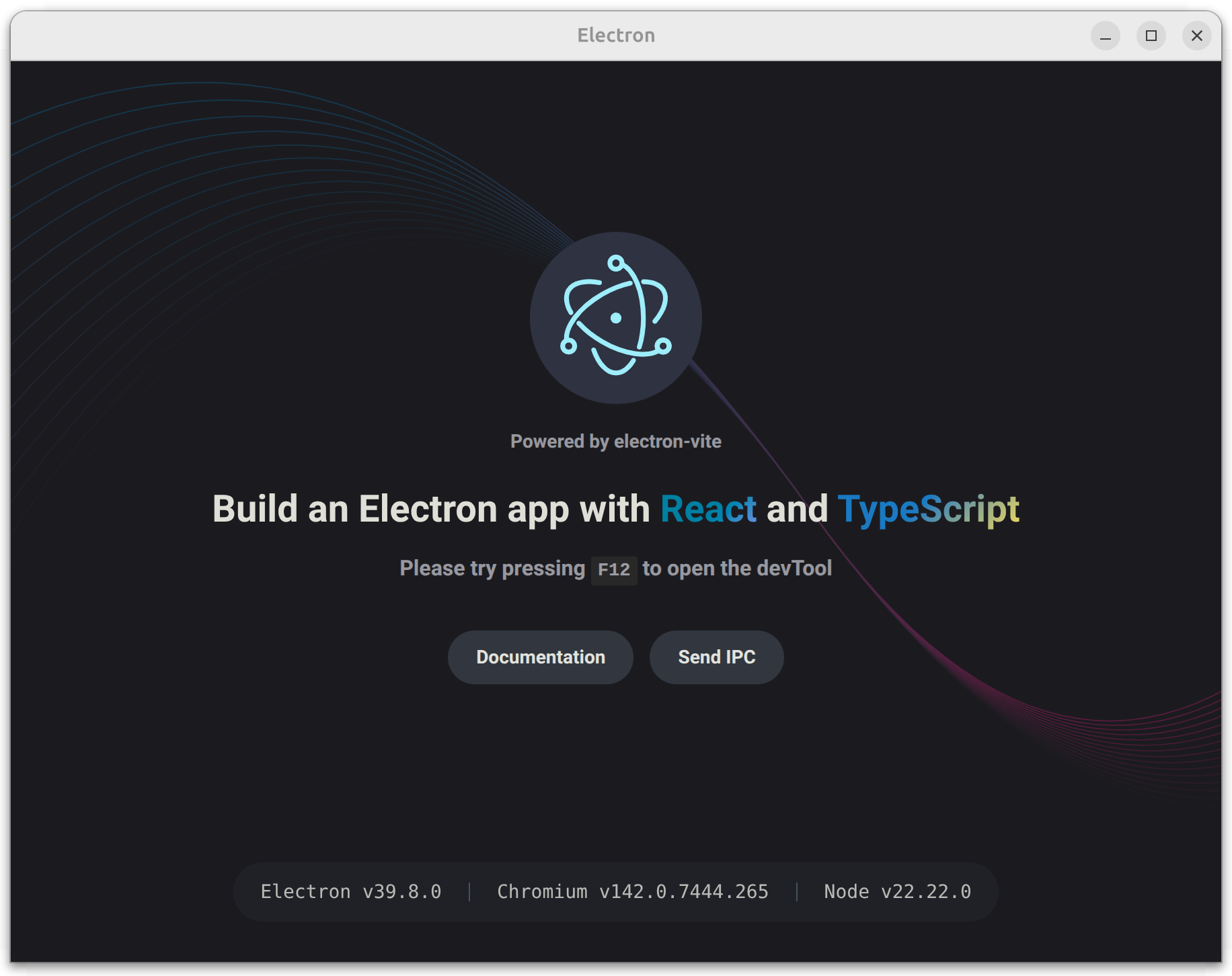
Confirm that an Electron window opens and renders the default electron-vite page:

<div style={{ display: "flex", justifyContent: "center" }}>
  <img src="/screenshots/electron-vite-window.png" alt="Electron window" style={{ width: "50%", height: "auto" }} />
</div>

The scaffold gives us a working Electron app with React, TypeScript, Vite HMR, and a preload script — all pre-configured. The key files we'll modify are:

| File                       | Purpose                              |
| -------------------------- | ------------------------------------ |
| `src/main/index.ts`        | Electron main process                |
| `src/preload/index.ts`     | IPC bridge between main and renderer |
| `src/preload/index.d.ts`   | Type declarations for the bridge     |
| `src/renderer/src/App.tsx` | React root component                 |
| `electron.vite.config.ts`  | Vite config for all three processes  |

## Step 2: create the chat UI

In this step, we'll add Tailwind CSS and replace the scaffold's default UI with a chat interface. The chat will use stub responses for now — we'll wire it to QVAC in the next step.

<Steps>
  <Step>
    Install Tailwind CSS:

    ```bash
    npm i tailwindcss @tailwindcss/vite
    ```
  </Step>

  <Step>
    Add the Tailwind plugin to the renderer in `electron.vite.config.ts`:

    ```ts title="electron.vite.config.ts" lineNumbers
    import { resolve } from 'path'
    import { defineConfig } from 'electron-vite'
    import react from '@vitejs/plugin-react'
    import tailwindcss from '@tailwindcss/vite' // [!code ++]

    export default defineConfig({
      main: {},
      preload: {},
      renderer: {
        resolve: {
          alias: {
            '@renderer': resolve('src/renderer/src')
          }
        },
        plugins: [react()] // [!code --]
        plugins: [react(), tailwindcss()] // [!code ++]
      }
    })
    ```

    This tells Vite to process Tailwind utility classes in the renderer.
  </Step>

  <Step>
    Replace the entire contents of `src/renderer/src/assets/main.css` with the following code:

    ```css title="src/renderer/src/assets/main.css"
    @import 'tailwindcss';
    ```

    This replaces the scaffold's default styles with Tailwind's base layer.
  </Step>

  <Step>
    Replace the entire contents of `src/renderer/src/main.tsx` with the following code:

    ```ts title="src/renderer/src/main.tsx" lineNumbers
    import './assets/main.css'
    import { createRoot } from 'react-dom/client'
    import App from './App'

    createRoot(document.getElementById('root')!).render(<App />)
    ```

    This removes React Strict Mode, which avoids double-invoked effects in development. That matters when we load a model in `useEffect`.
  </Step>

  <Step>
    Replace the entire contents of `src/renderer/src/App.tsx` with the following code:

    <WrapCode>
      ```ts title="src/renderer/src/App.tsx" lineNumbers
      import { useState } from 'react'

      type Message = { role: 'user' | 'assistant'; content: string }

      function App(): React.JSX.Element {
        const [loading, setLoading] = useState(false)
        const [messages, setMessages] = useState<Message[]>([])
        const [input, setInput] = useState('')

        const handleSend = (): void => {
          if (!input.trim()) return
          setMessages(prev => [
            ...prev,
            { role: 'user', content: input },
            { role: 'assistant', content: 'Stub response from the assistant.' }
          ])
          setInput('')
        }

        return (
          <div className="h-screen flex flex-col bg-zinc-950 text-zinc-100">
            {/* Header */}
            <header className="flex items-center gap-3 px-6 py-4 border-b border-zinc-800">
              <h1 className="text-lg font-semibold">LLM Desktop App</h1>
              <span className="ml-auto flex items-center gap-2 text-sm text-zinc-500">
                <span
                  className={`inline-block w-2 h-2 rounded-full ${
                    loading ? 'bg-amber-400 animate-pulse' : 'bg-emerald-400'
                  }`}
                />
                {loading ? 'Loading model…' : 'Ready'}
              </span>
            </header>

            {/* Messages */}
            <main className="flex-1 overflow-y-auto px-6 py-4 space-y-3">
              {loading ? (
                <div className="flex-1 flex items-center justify-center h-full">
                  <div className="flex gap-1">
                    <span className="w-2 h-2 rounded-full bg-zinc-600 animate-bounce [animation-delay:0ms]" />
                    <span className="w-2 h-2 rounded-full bg-zinc-600 animate-bounce [animation-delay:150ms]" />
                    <span className="w-2 h-2 rounded-full bg-zinc-600 animate-bounce [animation-delay:300ms]" />
                  </div>
                </div>
              ) : (
                messages.map((msg, i) => (
                  <div
                    key={i}
                    className={`flex ${msg.role === 'user' ? 'justify-end' : 'justify-start'}`}
                  >
                    <div
                      className={`max-w-[75%] px-4 py-2.5 rounded-2xl text-sm leading-relaxed ${
                        msg.role === 'user'
                          ? 'bg-indigo-600 text-white rounded-br-md'
                          : 'bg-zinc-800 text-zinc-100 rounded-bl-md'
                      }`}
                    >
                      {msg.content}
                    </div>
                  </div>
                ))
              )}
            </main>

            {/* Input */}
            <div className="px-6 py-4 border-t border-zinc-800">
              <div className="flex gap-3">
                <textarea
                  className="flex-1 resize-none rounded-xl bg-zinc-800 px-4 py-3 text-sm outline-none placeholder:text-zinc-500 focus:ring-2 focus:ring-indigo-500/50"
                  rows={1}
                  placeholder="Type a message…"
                  value={input}
                  onChange={e => setInput(e.target.value)}
                  onKeyDown={e => {
                    if (e.key === 'Enter' && !e.shiftKey) {
                      e.preventDefault()
                      handleSend()
                    }
                  }}
                />
                <button
                  onClick={handleSend}
                  className="self-end rounded-xl bg-indigo-600 px-4 py-3 text-sm font-medium text-white hover:bg-indigo-500 transition-colors"
                >
                  Send
                </button>
              </div>
            </div>
          </div>
        )
      }

      export default App
      ```

      We replaced the scaffold's default UI with a dark-themed chat interface. The header shows the app name and a status indicator. Messages render as right-aligned (user) or left-aligned (assistant) bubbles. For now, `handleSend` appends a stub response — we'll connect it to QVAC next.
    </WrapCode>
  </Step>

  <Step>
    Restart `npm run dev` so the Vite config changes take effect.
  </Step>
</Steps>

Confirm that you see the chat UI and that clicking **Send** appends a user message and a stub response:

<div style={{ display: "flex", justifyContent: "center" }}>
  <img src="/screenshots/ui-chat.png" alt="UI chat" style={{ width: "50%", height: "auto" }} />
</div>

## Step 3: add QVAC

Finally, in this step we'll wire the Electron main process to the QVAC SDK, expose a safe preload API, and stream completions into the chat UI.

<Steps>
  <Step>
    Install QVAC SDK:

    ```bash
    npm i @qvac/sdk
    ```
  </Step>

  <Step>
    Replace the entire contents of `src/preload/index.ts` with the following code:

    ```ts title="src/preload/index.ts" lineNumbers
    import { contextBridge, ipcRenderer } from 'electron'

    contextBridge.exposeInMainWorld('qvacAPI', {
      loadModel: (): Promise<string> => ipcRenderer.invoke('load-model'),
      infer: (history: { role: string; content: string }[]): Promise<void> =>
        ipcRenderer.invoke('infer', history),
      onCompletionStream: (cb: (token: string) => void): void => {
        ipcRenderer.on('completion-stream', (_event, token) => cb(token))
      },
      unloadModel: (): Promise<string> => ipcRenderer.invoke('unload-model')
    })
    ```

    This bridges the renderer to the main process via IPC. Each method maps to a handler we'll define next. The renderer never gets direct Node.js access.
  </Step>

  <Step>
    Replace the entire contents of `src/preload/index.d.ts` with the following code:

    ```ts title="src/preload/index.d.ts"
    declare global {
      interface Window {
        qvacAPI: {
          loadModel: () => Promise<string>
          infer: (history: { role: string; content: string }[]) => Promise<void>
          onCompletionStream: (cb: (token: string) => void) => void
          unloadModel: () => Promise<string>
        }
      }
    }

    export {}
    ```

    This tells TypeScript about the `window.qvacAPI` shape so the renderer gets full type checking.
  </Step>

  <Step>
    Replace the entire contents of `src/main/index.ts` with the following code:

    <WrapCode>
      ```ts title="src/main/index.ts" lineNumbers
      import { app, BrowserWindow, ipcMain } from 'electron'
      import { join } from 'path'
      import { electronApp, optimizer, is } from '@electron-toolkit/utils'
      import {
        LLAMA_3_2_1B_INST_Q4_0,
        loadModel,
        unloadModel,
        completion
      } from '@qvac/sdk'

      app.commandLine.appendSwitch('no-sandbox')

      let win: BrowserWindow | null = null
      let modelId: string | null = null

      function createWindow(): void {
        win = new BrowserWindow({
          width: 900,
          height: 670,
          show: false,
          webPreferences: {
            preload: join(__dirname, '../preload/index.js'),
            contextIsolation: true,
            nodeIntegration: false
          }
        })

        win.on('ready-to-show', () => win!.show())

        if (is.dev && process.env['ELECTRON_RENDERER_URL']) {
          win.loadURL(process.env['ELECTRON_RENDERER_URL'])
        } else {
          win.loadFile(join(__dirname, '../renderer/index.html'))
        }
      }

      function setupHandlers(): void {
        ipcMain.handle('load-model', async () => {
          modelId = await loadModel({
            modelSrc: LLAMA_3_2_1B_INST_Q4_0,
            modelType: 'llm',
            onProgress: (progress) => console.log(progress)
          })
          return 'model loaded'
        })

        ipcMain.handle('infer', async (_event, history) => {
          if (!modelId) throw new Error('Model not loaded.')

          const result = completion({ modelId, history, stream: true })
          for await (const token of result.tokenStream) {
            win?.webContents.send('completion-stream', token)
          }
          win?.webContents.send('completion-stream', '')
        })

        ipcMain.handle('unload-model', async () => {
          if (!modelId) throw new Error('Model not loaded.')
          await unloadModel({ modelId })
          modelId = null
          return 'model unloaded'
        })
      }

      app.whenReady().then(() => {
        electronApp.setAppUserModelId('com.electron')
        app.on('browser-window-created', (_, window) => {
          optimizer.watchWindowShortcuts(window)
        })
        createWindow()
        setupHandlers()
      })

      app.on('window-all-closed', () => {
        if (process.platform !== 'darwin') app.quit()
      })
      ```
    </WrapCode>

    The main process now loads `LLAMA_3_2_1B_INST_Q4_0` via `loadModel()`, runs streaming `completion()` calls, and forwards each token to the renderer over IPC. The `no-sandbox` flag is required for QVAC on Linux.
  </Step>

  <Step>
    Replace the entire contents of `src/renderer/src/App.tsx` with the following code:

    <WrapCode>
      ```ts title="src/renderer/src/App.tsx" lineNumbers
      import { useEffect, useRef, useState } from 'react'

      type Message = { role: 'user' | 'assistant'; content: string }

      function App(): React.JSX.Element {
        const [loading, setLoading] = useState(true)
        const [processing, setProcessing] = useState(false)
        const [messages, setMessages] = useState<Message[]>([])
        const [input, setInput] = useState('')
        const bottomRef = useRef<HTMLDivElement>(null)

        useEffect(() => {
          window.qvacAPI.loadModel().then(() => setLoading(false))

          window.qvacAPI.onCompletionStream((token) => {
            if (token === '') {
              setProcessing(false)
            } else {
              setMessages(prev => {
                const updated = [...prev]
                updated[updated.length - 1].content += token
                return updated
              })
            }
          })

          return () => { window.qvacAPI.unloadModel() }
        }, [])

        useEffect(() => {
          bottomRef.current?.scrollIntoView({ behavior: 'smooth' })
        }, [messages])

        const handleSend = (): void => {
          if (!input.trim() || processing || loading) return

          const nextHistory: Message[] = [
            ...messages,
            { role: 'user', content: input }
          ]
          setMessages([...nextHistory, { role: 'assistant', content: '' }])
          window.qvacAPI.infer([
            { role: 'system', content: 'You are a helpful assistant.' },
            ...nextHistory
          ])
          setInput('')
          setProcessing(true)
        }

        return (
          <div className="h-screen flex flex-col bg-zinc-950 text-zinc-100">
            {/* Header */}
            <header className="flex items-center gap-3 px-6 py-4 border-b border-zinc-800">
              <h1 className="text-lg font-semibold">LLM Desktop App</h1>
              <span className="ml-auto flex items-center gap-2 text-sm text-zinc-500">
                <span
                  className={`inline-block w-2 h-2 rounded-full ${
                    loading ? 'bg-amber-400 animate-pulse' : 'bg-emerald-400'
                  }`}
                />
                {loading ? 'Loading model…' : 'Ready'}
              </span>
            </header>

            {/* Messages */}
            <main className="flex-1 overflow-y-auto px-6 py-4 space-y-3">
              {loading ? (
                <div className="flex-1 flex items-center justify-center h-full">
                  <div className="flex gap-1">
                    <span className="w-2 h-2 rounded-full bg-zinc-600 animate-bounce [animation-delay:0ms]" />
                    <span className="w-2 h-2 rounded-full bg-zinc-600 animate-bounce [animation-delay:150ms]" />
                    <span className="w-2 h-2 rounded-full bg-zinc-600 animate-bounce [animation-delay:300ms]" />
                  </div>
                </div>
              ) : (
                messages.map((msg, i) => (
                  <div
                    key={i}
                    className={`flex ${msg.role === 'user' ? 'justify-end' : 'justify-start'}`}
                  >
                    <div
                      className={`max-w-[75%] px-4 py-2.5 rounded-2xl text-sm leading-relaxed ${
                        msg.role === 'user'
                          ? 'bg-indigo-600 text-white rounded-br-md'
                          : 'bg-zinc-800 text-zinc-100 rounded-bl-md'
                      }`}
                    >
                      {msg.content}
                    </div>
                  </div>
                ))
              )}
              <div ref={bottomRef} />
            </main>

            {/* Input */}
            <div className="px-6 py-4 border-t border-zinc-800">
              <div className="flex gap-3">
                <textarea
                  className="flex-1 resize-none rounded-xl bg-zinc-800 px-4 py-3 text-sm outline-none placeholder:text-zinc-500 focus:ring-2 focus:ring-indigo-500/50"
                  rows={1}
                  placeholder="Type a message…"
                  value={input}
                  onChange={e => setInput(e.target.value)}
                  onKeyDown={e => {
                    if (e.key === 'Enter' && !e.shiftKey) {
                      e.preventDefault()
                      handleSend()
                    }
                  }}
                />
                <button
                  onClick={handleSend}
                  disabled={processing || loading}
                  className="self-end rounded-xl bg-indigo-600 px-4 py-3 text-sm font-medium text-white hover:bg-indigo-500 transition-colors disabled:opacity-40 disabled:cursor-not-allowed"
                >
                  Send
                </button>
              </div>
            </div>
          </div>
        )
      }

      export default App
      ```
    </WrapCode>

    The chat UI is now fully wired to QVAC. On mount, it loads the model and subscribes to streaming tokens. `handleSend` pushes the conversation history through the preload bridge, and each token appends to the latest assistant bubble. The `bottomRef` keeps the view scrolled to the newest message.
  </Step>

  <Step>
    Run the app from the project root:

    ```bash
    npm run dev
    ```
  </Step>
</Steps>

On the first run, the model may download from peers (watch the terminal for progress). Once it finishes, type a message and press **Enter** or click **Send** — the response should stream into the UI token by token:

<div style={{ display: "flex", justifyContent: "center" }}>
  <img src="/screenshots/task-completed.png" alt="Task completed" style={{ width: "50%", height: "auto" }} />
</div>

## Step 4: package for distribution

Now that the app works in dev env, let's build a distributable using `@qvac/sdk/electron-forge`, which:

* Bundles the QVAC worker for the target platform/arch.
* Tree-shakes unused `@qvac/*` addons.
* Prunes native prebuilds to match the target platform.
* Refuses configurations known to produce broken apps.

<Steps>
  <Step>
    Install Electron Forge and `@qvac/sdk/electron-forge` peer dependency:

    ```bash
    npm i -D @electron-forge/cli @electron-forge/plugin-base @electron-forge/maker-zip
    ```

    `@electron-forge/plugin-base` is `@qvac/sdk/electron-forge` only peer dependency. `@electron-forge/maker-zip` produces a zip distributable; add other makers (`@electron-forge/maker-dmg`, `@electron-forge/maker-squirrel`, etc.) as needed.
  </Step>

  <Step>
    Move `electron-vite` output to `dist/`, to resolve the `out/` directory collision:

    ```ts title="electron.vite.config.ts" lineNumbers
    import { resolve } from 'path'
    import { defineConfig } from 'electron-vite'
    import react from '@vitejs/plugin-react'
    import tailwindcss from '@tailwindcss/vite'

    export default defineConfig({
      main: {
        build: { outDir: 'dist/main' } // [!code ++]
      },
      preload: {
        build: { outDir: 'dist/preload' } // [!code ++]
      },
      renderer: {
        build: { outDir: 'dist/renderer' }, // [!code ++]
        resolve: {
          alias: {
            '@renderer': resolve('src/renderer/src')
          }
        },
        plugins: [react(), tailwindcss()]
      }
    })
    ```
  </Step>

  <Step>
    Update field `main` in `package.json` to point at the new location:

    ```bash
    npm pkg set main="./dist/main/index.js"
    ```
  </Step>

  <Step>
    Add `forge.config.cjs` at project root:

    ```js title="forge.config.cjs" lineNumbers
    "use strict";

    const QvacForgePlugin = require("@qvac/sdk/electron-forge");

    module.exports = {
      packagerConfig: {
        name: "llm-desktop-app"
      },
      rebuildConfig: {},
      makers: [
        { name: "@electron-forge/maker-zip", platforms: ["darwin", "linux", "win32"] }
      ],
      plugins: [
        new QvacForgePlugin({
          logLevel: "info"
        })
      ]
    };
    ```
  </Step>

  <Step>
    *(Optional)* Add a `qvac.config.json` to declare which QVAC plugins your app uses:

    ```json title="qvac.config.json"
    {
      "plugins": ["@qvac/sdk/llamacpp-completion/plugin"]
    }
    ```

    With no `qvac.config.json`, `QvacForgePlugin` auto-discovers, and bundles all built-in QVAC plugins. Listing only what you use produces a smaller worker bundle. See [Plugin system](/configuration/plugins) for details.
  </Step>

  <Step>
    Add `package` and `make` scripts that compile your code with `electron-vite`, then package with `electron-forge`:

    ```bash
    npm pkg set scripts.package="electron-vite build && electron-forge package"
    npm pkg set scripts.make="electron-vite build && electron-forge make"
    ```
  </Step>

  <Step>
    Build a packaged app:

    ```bash
    npm run package
    ```

    This will:

    1. Compile main, preload, and renderer to `dist/`.
    2. Run `bundleSdk` to produce `qvac/worker.bundle.js` for your target platform.
    3. Run `verifyBundle` to assert all required addon prebuilds are available.
    4. Package the app to `out/<name>-<platform>-<arch>/`.
    5. Tree-shake unused `@qvac/*` addons and prune non-target prebuilds.
  </Step>

  <Step>
    Finally, produce `.zip` / `.dmg` / `.exe` distributables from the makers in `forge.config.cjs`:

    ```bash
    npm run make
    ```
  </Step>
</Steps>

## Packaging caveats

* **`asar: false` is forced.** The Bare worker can't load addons from inside an ASAR archive — paths inside `app.asar` aren't real files on disk. `QvacForgePlugin` overrides any `packagerConfig.asar` setting and warns if you've set it to anything else.

* **macOS universal builds are blocked.** Native addon prebuilds are arch-specific (`darwin-arm64.bare` vs `darwin-x64.bare`); a universal Electron app would need to ship both prebuild sets, which conflicts with `QvacForgePlugin` single-arch pruning. Build the two architectures separately:

  ```bash
  npx electron-forge package --platform=darwin --arch=arm64
  npx electron-forge package --platform=darwin --arch=x64
  ```

* **Cross-platform packaging is supported.** `QvacForgePlugin` reads `--platform` and `--arch` from CLI args (and from `packagerConfig` in the config file) to drive both `bundleSdk` and `verifyBundle`. From a darwin-arm64 host you can package for darwin-x64 as long as each addon ships a `darwin-x64.bare` prebuild:

  ```bash
  npx electron-forge package --platform=darwin --arch=x64
  ```
